School & Campus Safety
A single team can't watch every camera across a school district or university campus. QORA adds an AI layer to the cameras you already run — surfacing after-hours intrusion, perimeter breaches, loitering and dismissal-time crowding, with a human confirming every alert before it reaches your staff.
Detections tuned for campuses
Illustrative — QORA output shown on representative scenes, not customer footage.

After-hours intrusion
Detect people entering buildings, gyms or portables outside school hours and alert immediately.

Perimeter & fence line
Watch fences, field edges and back-of-campus access points for climbing or unauthorized entry.
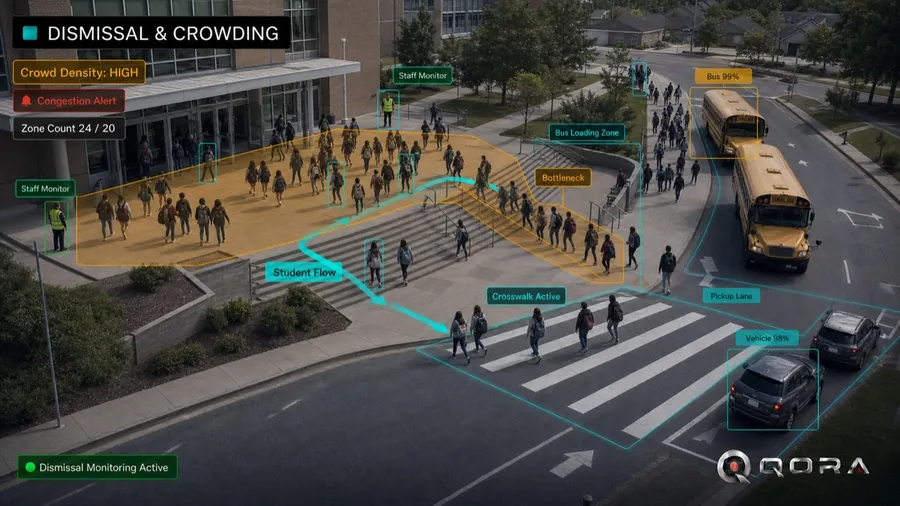
Dismissal & crowding
Surface unusual crowding at entrances, stairwells and pickup lines so staff can respond fast.

Parking & vehicle gates
Extend coverage to student and staff lots — vehicles, plates and loitering around the building.
Why campuses choose QORA
- Works with the cameras and NVR you already run — no rip-and-replace across buildings.
- District-wide view: manage every school and building from one console with role-based access.
- AI reduces alarm fatigue by surfacing only events worth a look — with snapshot evidence attached.
- Privacy-first: facial recognition and biometrics are off by default, gated behind explicit consent, with a full audit trail on every action.
Built for a school environment
QORA is a monitoring and operations layer — not a surveillance dragnet. Biometric features stay off unless an administrator explicitly enables them under a signed consent agreement, on-site edge processing keeps footage local, and every alert is reviewed by a person before your team is notified. You decide what QORA watches for, building by building.
How an incident is handled
1 · Detect
QORA analyzes your existing camera feeds for the scenarios you turn on.
2 · AI Review
Obvious false alarms are auto-resolved and related detections are grouped, so your team sees real incidents — not raw motion.
3 · Human confirms
A person reviews the flagged incident. QORA never takes automated action against a person.
4 · Alert & log
Confirmed incidents notify your recipients and stay in a searchable, audited log.
Privacy & operational considerations
You own your data
Configurable retention and deletion. Sensitive analytics stay off unless you explicitly enable them.
Human in the loop
QORA surfaces events for a person to confirm — no automated adverse action, no inferred protected-class decisions.
No facial recognition
QORA focuses on perimeter, after-hours activity, crowding and vehicle access. Facial recognition is off and is not used for campus safety.
Sensitive analytics are off by default, and every flagged event is reviewed by a person before any action. You are responsible for lawful camera placement and any required notice or signage. See our Privacy Policy.
Ready to see everything?
Talk to us about a pilot on your campus cameras — book a 20-minute demo.
Explore: Platform · Security & Trust · 30-Day Pilot